Go to chatgpt.com/business-hub, search for your business, select your listing (or Get started if it isn’t there), verify it by phone, email, a DNS record or Shopify, then pass the Persona ID check. It’s free: the forms take minutes, then OpenAI reviews your claim.
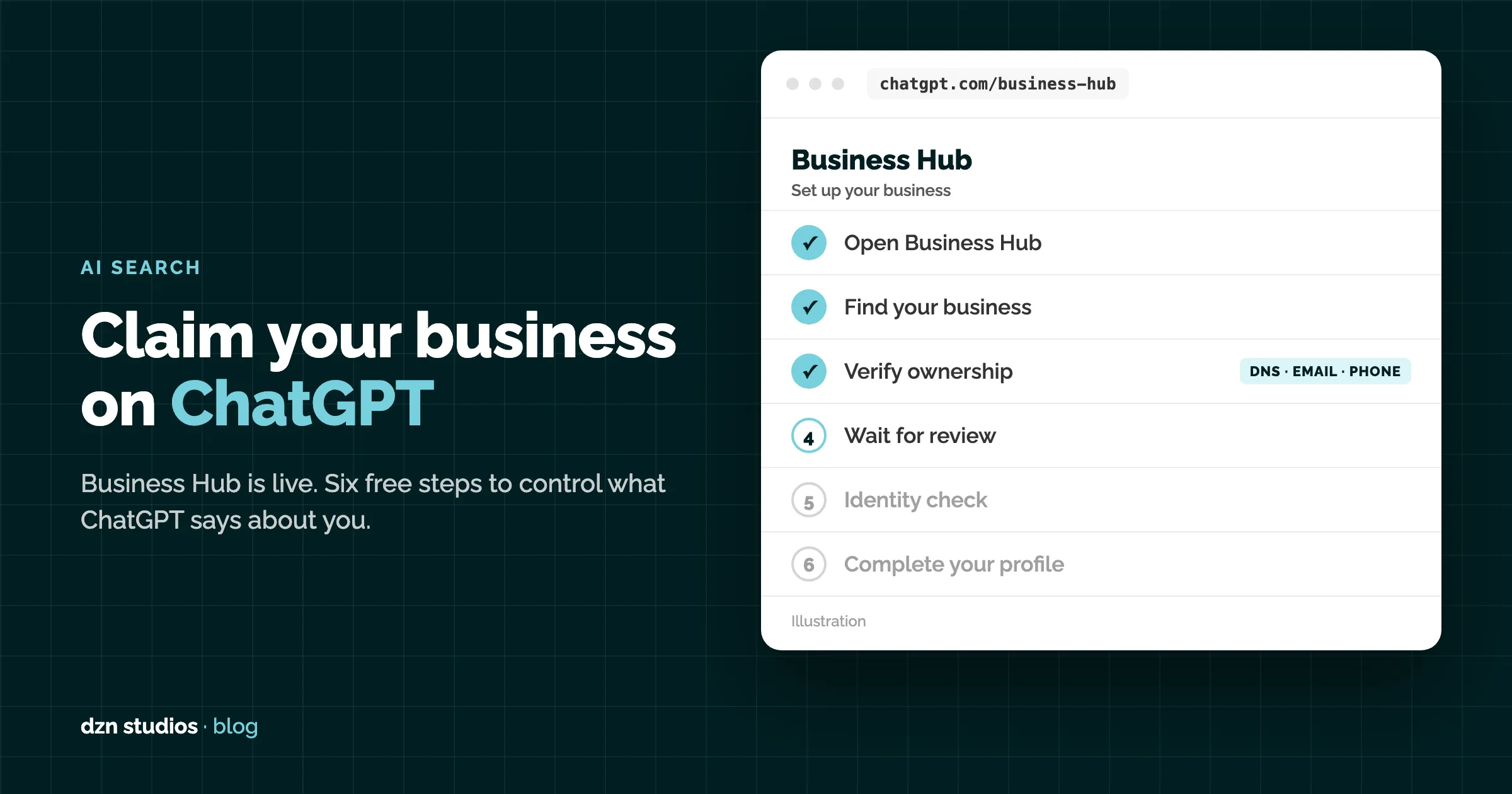
OpenAI has opened Business Hub: one place to control what ChatGPT says about your business. Claim it before someone else gets the details wrong.
How to set it up in 6 steps
- Open Business Hub. Sign in to ChatGPT and click Business Hub in the sidebar, or go straight to chatgpt.com/business-hub.
- Find your business. Search by name, select the matching listing and confirm which ChatGPT account will manage it. Not listed? Click Get started, choose how customers buy from you and enter your website.
- Prove it’s yours. Pick one: a code sent to your business phone or email, a TXT record added to your domain’s DNS (then Verify domain), or Connect Shopify.
- Wait for approval. OpenAI reviews the claim and emails you the decision.
- Pass the ID check. Complete identity verification with Persona: government ID, business registration details and proof you can act for the business. This is what unlocks editing and gives you the blue check.
- Fill it in. Add your description, category, logo, cover photo, and delivery and returns policies. Selling online? Upload a product feed (CSV or JSONL) or connect Shopify, then watch Insights for mentions and clicks over the last 28 days.
UK businesses, read this first. At launch, only online stores could complete a new profile. Shops and restaurants went onto a waitlist, service businesses were marked “Coming soon”, and Business Agents (the AI sales rep) are US only. Join the queue now so you’re ready when it opens.
Three quick wins
- Use the same name, address and phone everywhere: your site, Google Business Profile and Business Hub. Mismatches slow verification.
- Verify by DNS if you can. It’s the method that proves you own the website itself.
- Claiming isn’t ranking. OpenAI says it doesn’t guarantee higher placement. Your website still does the heavy lifting. Restaurants: here’s how to get recommended by ChatGPT.
Steps based on OpenAI’s Business Hub beta as launched on 10 November 2026. OpenAI says eligibility and features will expand, so check Business Hub for the latest.
Frequently asked questions
What is ChatGPT Business Hub?
Business Hub is OpenAI’s free tool for businesses to claim and manage how they appear in ChatGPT. Once verified, you can edit your business details, upload a product feed, see how often ChatGPT mentions you and, in the US, publish a Business Agent that answers customer questions. It launched in beta on 10 November 2026.
Does it cost anything to claim my business on ChatGPT?
No. OpenAI lists no fee for claiming a business or using Business Hub at launch. ChatGPT Ads is a separate, paid product, and OpenAI has not ruled out charging for some features later.
Can UK businesses use ChatGPT Business Hub?
Partly. Claiming is open to eligible businesses wherever ChatGPT is available, but at launch only online stores could complete a new profile. Physical locations such as shops and restaurants joined a waitlist (claiming existing local listings is US only), service businesses were marked “Coming soon”, and Business Agents are limited to the US.
Will claiming my business make ChatGPT recommend it more?
Not by itself. OpenAI says claiming does not guarantee higher placement or sales. It makes sure ChatGPT has accurate details about you. Being recommended still depends on your website, reviews and what other sites say about you.