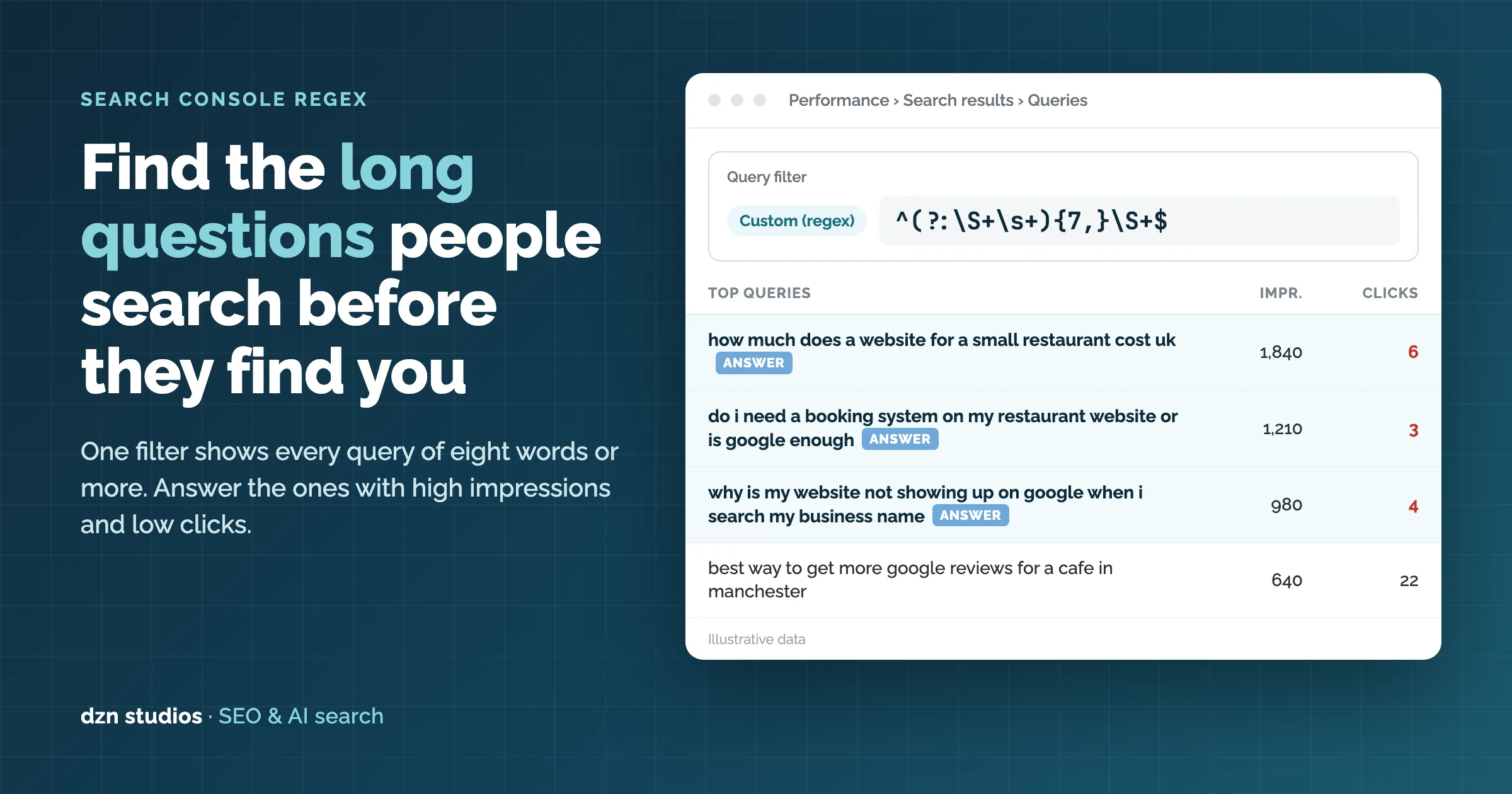
In Google Search Console, open Performance › Search results, add a Query filter set to Custom (regex), and paste ^(?:\S+\s+){7,}\S+$. The report then shows only searches of eight words or more. Sort by impressions, pick the queries with plenty of impressions and few clicks, and answer each one in the first lines of the page that already ranks for it.
Why long searches matter more now
Most keyword reports are full of two and three word phrases such as “web design manchester” or “restaurant booking system”. Those tell you the topic. They don’t tell you what the person actually wanted to know.
Long searches do. A query like “why is my website not showing up on google when i search my business name” is a full question with a specific problem behind it. Someone who types that has a clear intent and is often close to acting on it.
These are also the questions people now ask ChatGPT, Gemini and Google’s AI answers. People write to AI assistants in full sentences, and they have started searching the same way. Your Search Console data is the nearest thing you have to a list of the prompts your customers use. When your page answers that question clearly and early, it gives both Google and AI tools a passage they can quote.
How to set up the filter, step by step
- Open Google Search Console and choose your property.
- Go to Performance › Search results.
- Set the date range to Last 3 months. Use 12 or 16 months if your site is small.
- Switch on the Total impressions, Average CTR and Average position cards at the top so those columns show in the table.
- Click + Add filter, choose Query, change the dropdown to Custom (regex), leave it on Matches regex, and paste the pattern below.
- Click Apply, then click the Impressions column header to sort from highest to lowest.
^(?:\S+\s+){7,}\S+$
The Queries table now lists only searches of eight words or more, with the ones Google shows you for most often at the top.
What the regex does, and useful variations
The pattern counts words by counting the gaps between them. Here is each piece:
| Part | What it means |
|---|---|
^ | Start at the beginning of the query. |
\S+ | One word: a run of characters that aren’t spaces. |
\s+ | The space after that word. |
(?:\S+\s+){7,} | A word plus a space, repeated seven or more times. |
\S+$ | One final word, then the end of the query. Seven plus one makes eight or more words. |
Change the number to move the cut-off, or swap in one of these patterns:
| To find | Paste this |
|---|---|
| Queries of 5+ words (smaller sites) | ^(?:\S+\s+){4,}\S+$ |
| Queries of 10+ words | ^(?:\S+\s+){9,}\S+$ |
| Questions of 6+ words | ^(who|what|when|where|why|how|which|can|does|do|is|are|should|will)\s+(?:\S+\s+){4,}\S+$ |
| Comparison searches | \b(vs|versus|or|alternative|alternatives|compared)\b |
Good to know: Search Console uses Google’s RE2 regex syntax. It doesn’t support lookaheads, which is why the question pattern above builds the word count into one expression. Matching is case-sensitive. Queries are almost always stored in lower case, but you can add (?i) at the start of a pattern to be safe.
Which queries to answer first
Look for high impressions and low clicks. Google already thinks your site is relevant to these queries because it keeps showing you for them. Searchers just aren’t choosing your result. Use the average position column to decide what to do with each one:
| Average position | What it usually means | What to do |
|---|---|---|
| 1–3, low CTR | The question is probably being answered on the results page, by an AI Overview or a featured snippet, before anyone clicks. | Make your page the clearest source for that answer, and rewrite the title and meta description to promise what the snippet leaves out. |
| 4–15 | Your page is relevant but isn’t the best answer yet. This is usually the biggest win. | Answer the question directly near the top of the ranking page. |
| 16+ | The page only touches on the topic. | Add a dedicated section, or a new page if the intent really is different. |
To see which page ranks for a query, click the query in the table and then open the Pages tab. That page is where the answer goes. You don’t need to start from scratch.
Expect to see the same question asked a dozen ways. Group them and write one answer that covers the group, not one answer for each phrasing.
How to answer them at the top of the page
Both Google and AI assistants pull short passages from pages and show them as answers. Write the answer so it still makes sense if it is lifted out on its own:
- Lead with the answer. Put a direct reply of 40 to 60 words in the first screen of the page, before any background.
- Use the question as a heading. An H2 that closely matches the search, such as “Why isn’t my business showing up on Google?”, tells readers and crawlers what the next paragraph answers.
- Make it self-contained. Name the thing you are talking about instead of writing “it” or “this”, and avoid answers that depend on the paragraph before them.
- Then add the detail. Steps, prices, examples, and local specifics for Manchester or wherever you work. This is what earns the click once the short answer has done its job.
- Collect the rest in an FAQ. Related long queries that don’t justify a section of their own work well as a short FAQ, marked up with FAQPage schema.
- Show who wrote it and when. A visible author and a real “updated” date help readers and search engines judge whether to trust the answer.
An example
Take the long query “why is my website not showing up on google when i search my business name”. Instead of opening with an introduction to SEO, the page should start with something like:
If your website doesn’t appear when you search your business name, Google most likely hasn’t indexed it yet, or something is telling Google not to. Check the page in Search Console’s URL Inspection tool, make sure no “noindex” tag is set, submit your sitemap, and set up a Google Business Profile that links to the site.
That paragraph answers the question in under 60 words, works out of context, and leaves the reader wanting the step-by-step fix underneath.
Don’t paste the raw query into your copy word for word. Long queries are often ungrammatical. Answer the question they ask in natural English.
How to tell if it worked
- Once the page is updated, use URL Inspection › Request indexing in Search Console so Google recrawls it sooner.
- Wait four to eight weeks. Long queries have small volumes, so results take a while to show.
- Back in Performance, keep the regex filter, add a Page filter for that URL, and use the date picker’s Compare tab to set the period after the change against the same length of time before it.
- Look for higher CTR and clicks on those queries. Also look for new long queries appearing. That is often the first sign that the page now covers the topic better.
Limits to keep in mind: Search Console leaves out very rare queries to protect searchers’ privacy, so you only ever see part of the long tail. The table also stops at 1,000 rows. On a large site, export the data or use Looker Studio or the Search Console API to see the full list.
Frequently asked questions
What regex shows long search queries in Google Search Console?
Use ^(?:\S+\s+){7,}\S+$ as a Custom (regex) query filter in Performance › Search results. It matches any query of eight words or more. Change the 7 to 4 for queries of five words or more, or to 9 for ten words or more.
Why do long search queries matter for ChatGPT and AI search?
Long queries are written the way people talk to AI assistants: a full question with context. They are the closest thing in your own data to the prompts your customers type into ChatGPT, Gemini or Google’s AI answers. A page that answers those questions directly, near the top, is easier for both Google and AI tools to quote.
How many impressions count as “high” for this exercise?
There is no fixed number. Sort your long-query list by impressions and work through the top ten to twenty per cent. On a small local site that might be 50 impressions a month; on a busy site it could be thousands. What matters is the gap between impressions and clicks.
Why don’t I see any 8+ word queries in my report?
Either the date range is too short, the site has little search traffic yet, or the queries are too rare to show. Google hides very infrequent queries for privacy. Set the date range to the last 12 or 16 months, or lower the threshold to five words with ^(?:\S+\s+){4,}\S+$.
Should I create a new page for every long query?
Usually not. Most long queries are a more specific version of something an existing page already covers, and that page is already ranking. Add a clear answer to that page first. Create a new page only when the question has a different intent and no page on your site really covers it.